- Browser games
- Multiplayer
Browser Games: Why They’re Back and What to Play
Discover why browser games are getting attention, what to play solo or with friends, and how to turn a TV and phones into game night. Start here.
· 7 min read
Browser games run inside your web browser, so you can open a link and play without installing a separate game. That covers a lot: a puzzle on your lunch break, a drawing game with friends on a call, or a TV full of players using their phones as controllers.
The useful question is which kind fits the time, people and screens you have. Someone with ten minutes alone needs a different recommendation from someone with seven friends on the sofa. Here is how to choose, and why playing in a tab is getting attention again.
Why browser games are getting attention again
The appeal starts before the first round. There is no launcher to install and no store account required just to open the game page. A friend can send a link while you are talking, and you can see what they mean immediately.
There is evidence behind the renewed interest. In its State of Web Gaming report, published on 25 June 2026, Poki reported more than 100 million monthly active players on its platform, up from 10 million in 2020. Those are Poki's own audience figures, rather than a measurement of the whole browser gaming market.
The same report, based on research commissioned by Poki, identifies ease of access, avoiding downloads and short play sessions as reasons people choose web games. That fits the practical attraction: you can try something before deciding whether it deserves the rest of your evening.
The format also suits sharing. Sending a URL is easy whether your friend uses a different computer, a phone or a tablet, provided the game supports their device. And a short round gives a group permission to try something unfamiliar. Losing quickly is less of a commitment than installing something you might never open again.
Choose a browser game for the way you want to play
Start with the occasion. Genre can come second.
Playing alone: pick one clear challenge
For a short break, look for a game with an obvious stopping point: finish a puzzle, beat a score, complete a course. You should be able to understand what you are trying to do before working through a menu full of modes.
Poki is one place to browse this kind of game. Its catalogue includes Drive Mad, a driving challenge about keeping a vehicle balanced over uneven tracks, and Level Devil, a platformer with traps that undermine the obvious route. They suit different moods, but both give you a concrete problem to solve.
If you already have a big screen and a phone handy, several LanPlay games also support solo runs. The free browser games page separates those options from the full party catalogue. The phone still acts as your controller; solo does not change that setup.
Friends online: find a private room first
For people in different places, choose multiplayer browser games that let you invite your own group. A public match with strangers and a private room with your friends are different evenings, even when they use the same game.
skribbl.io offers private rooms for drawing and guessing: one person draws a word while everyone else tries to identify it. Gartic Phone turns written prompts into drawings and back into descriptions, then reveals what happened along the way. Its own instructions recommend getting friends on a voice call.
These formats give people something to talk about without requiring everyone to react to the same obstacle at precisely the same instant. For more options grouped by occasion, see our games to play with friends online guide.
Everyone in one room: put the action where everyone can see it
When friends are sitting together, a shared screen changes the atmosphere. A close finish happens in front of the whole room. People who are waiting for a turn can still follow what is happening.
Browser party games can split the job between devices: the TV shows the arena, and each phone sends one player's inputs. That is how LanPlay works. Nobody needs to pass a keyboard around or bring a console controller.
This is the better fit when the point is a group reacting to the same moment. Separate screens remain useful for games with private drawings or information; choose the arrangement that serves the game.
Browser multiplayer does not always mean the same setup
Before sending everyone a link, check three things: where the game is shown, what each person controls, and how your friends join.
- A browser on every player's device: each person sees their own game view. Check whether a private room exists, which controls it needs, and whether your friends' phones or laptops are supported.
- Two players sharing a keyboard: convenient for a pair at one computer. Check the actual local player limit before inviting a larger group.
- One shared screen with phone controllers: the host screen shows the game, while phones handle inputs. Check the room capacity and whether the game needs everyone to see the shared screen clearly.
“Multiplayer” alone does not answer any of those questions. Neither does “mobile-friendly”: a game can run on a phone without supporting a room full of phones connected to one TV.
Distance matters too. Screen sharing introduces delay between the host's game and what remote friends see. A drawing game gives people time to think; a last-second jump gives them much less margin. LanPlay's shared-screen arcade games are best suited to people watching the host screen together.
Turn your TV into a browser game night
For LanPlay, you need a host screen, an internet connection and a phone for each player. A laptop connected to a TV or projector works too. A TV with a slow or unsupported browser does not have to be the computer running the game.
- Open LanPlay on the host screen and choose Host a Game.
- Have each player scan the QR code with their phone, or use the join form with the room code shown on screen.
- Choose a game. The phones show its controls, and the shared screen shows the action.
There are no accounts to create or controller apps to install. The how-to-play guide covers the setup, including using a laptop with your TV. Pick the first game for the people in front of you:
Flappy Flock for a simple competitive start
In Flappy Flock, everyone taps to keep a bird in the air and thread it through pipes. The last bird flying wins. It supports one to eight players, and a single tap is the whole control scheme.
Use it to introduce the format without explaining teams, inventories or special moves. Everyone sees the same course, and each person is responsible for keeping their own bird alive.
Puff River when everyone wants to work together
Puff River puts one to eight players on a shared raft. Each phone has a PUFF button, and holding it pushes the raft away from your seat. Steering becomes a conversation about who should press and who should stop.
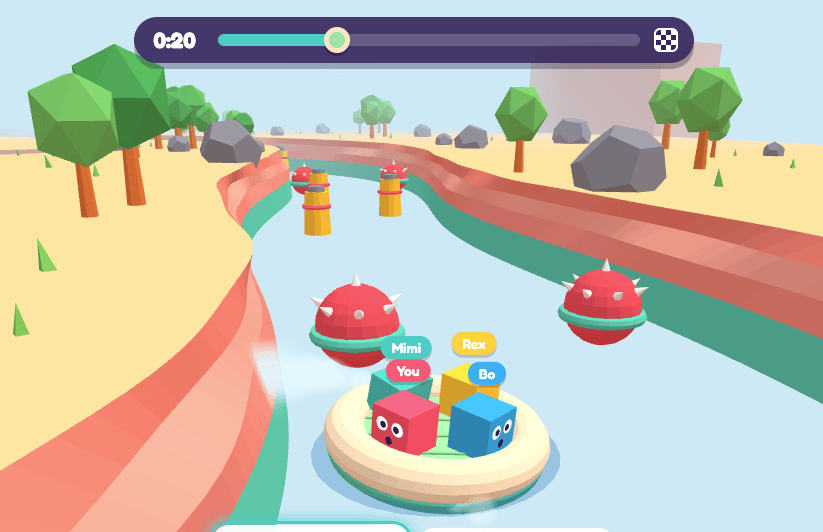
Puff River: the shared screen shows the course; each phone controls one player's puff.
The outcome belongs to everyone. Reaching the flag is a shared win; hitting a spiked mine ends the run for the whole raft. Choose it when you want cooperation with plenty of room for contradictory instructions.
Tower Tumble when the room wants a slower pace
Tower Tumble gives one to eight players turns dropping bricks from a swinging crane. The active player picks when to release; everybody else watches the stack settle.
It leaves more space for conversation than a simultaneous arcade round, while keeping the consequence visible to everyone. A brick hanging over the edge is also a problem you get to leave for the next person.
What to check before you press Play
Free browser games can still have costs. Some sites use ads, optional purchases or paid features. Check the particular game rather than assuming that running in a browser tells you how it earns money. LanPlay's catalogue is free, with no accounts or ads between rounds.
No download means no separate installation. Your browser still loads the game's images, audio and code. An internet connection and an initial loading period are normal. Browser play does not automatically mean offline play.
Device support varies. A game built around a mouse and keyboard may open on a phone but be awkward to control. Check its requirements, especially before relying on an older TV browser. Try one round on the host device before asking the whole group to join.
Browser games FAQ
Are browser games free?
Many are free to start, but pricing, ads and optional purchases vary by game. LanPlay's games are free to play without an account. Other platforms have their own models, so check the game page before committing your group to it.
Do browser games require downloads?
They load game files into the browser without requiring a separate app or desktop installation. You still use data and may need to wait for assets to load. An optional app offered by a service does not necessarily mean its browser version requires one.
Can I play browser games with friends?
Yes. For remote friends, look for private rooms and controls that suit everyone's devices. For a group in one room, a shared-screen game can keep the action visible to everyone. Check player limits and the screen arrangement before choosing.
Can I play on a phone or a TV?
It depends on the game and browser. Some games run directly on a phone; LanPlay uses phones as controllers for a separate host screen. If the TV browser struggles, connect a laptop to the TV and run the host view there.
If everyone is already in the room, browse the LanPlay games, open a room on the big screen, and let the first round teach the controls.
Try it on your own TV
Thirteen free party games, phones as controllers, nothing to install. Open it on the big screen and scan the code.
Host a GameRelated reading
Games Like Fart Together You Can Play Without Downloading Anything
Fart Together nailed the shared-raft co-op idea, but it needs a gaming PC and a Steam install per player. Here is what the same game looks like with the setup removed.
The LanPlays Android TV App: Install It Once, Skip the Browser Every Time
A dedicated LanPlay launcher for Android TV and Google TV: faster than typing a URL in the TV browser, and the exact same experience from that first tap.
Zero-Setup Party Games: Why Most ‘Quick’ Party Games Still Aren’t
The real cost of setup isn't install time — it's the gap between 'let's play something' and the first round starting. How LanPlay closes it entirely.