- Rhythm
- Piano Tiles
Piano Tiles in a Group: Three Ways to Play It With Friends
Piano Tiles is built for one thumb and one phone. Here is how to play it in a group — hotseat, side by side, or with the tiles on a TV and everyone holding a controller.
· 7 min read
Piano Tiles is a one-thumb game. Black tiles fall down a few lanes, you tap each one as it reaches the bottom, and a single wrong tap ends the run. It is built for one person, one phone, one score — which is exactly why playing Piano Tiles in a group turns into people leaning over a shoulder and waiting their turn.
There are two honest answers to "how do we play Piano Tiles together?" The first is to keep the original game and organise the room around it. The second is to play a version designed for a group from the start, where the falling tiles are dealt out across everybody's phones and shown on one screen. Both work. They suit different evenings.
What Piano Tiles actually is
The format is usually credited to Don't Tap the White Tile, a mobile game that became popular in 2014 and spawned a long line of imitators and sequels under the Piano Tiles name. The rules never got more complicated than the first version:
- Tiles scroll down a small number of lanes.
- Tap each black tile as it arrives; it plays the next note of a song.
- Tap a white space, or miss a tile, and the run is over.
That is the whole game. A run lasts as long as your accuracy does, and the song is the scoreboard — you can hear how far you got. The appeal is that it needs no explanation at all, which is also what makes people want to hand it round a room.
There is no official group mode. Anything that feels like multiplayer Piano Tiles is either a social arrangement you invent, or a different game that borrowed the mechanic.
Three ways to play Piano Tiles in a group
1. Hotseat: one phone, one score to beat
The simplest version. Pick a song, play one run each, and write the scores down. Everybody is attempting an identical challenge, so comparing results is fair in a way that most party games are not.
What to watch for: it is sequential. With six people and thirty-second runs you spend most of the evening watching. Good for a gap between other things; less good as the main event.
2. Side by side: two phones, same song, go
If two people have the game installed, start at the same time and see who survives longer. The tension is real because both runs are visibly fragile at once, and the sound tells you when someone has died before you look up.
What to watch for: it caps at however many phones have the game, and nobody else in the room can see either screen. It is a duel, not a party.
3. One screen, everyone's phone: the version built for a room
The third option changes the layout rather than the rules. Put the falling tiles on the TV where the whole room can see them, and give each person a couple of lanes on their own phone. Nobody installs anything; the phone is just the pad.
That is what Tile Rush does, and it is the part of this article where the honest framing matters: it is not Piano Tiles. It is a co-op rhythm game built around the same tap-the-tile instinct, made for one to eight players at once.
How Tile Rush turns the mechanic into a group game
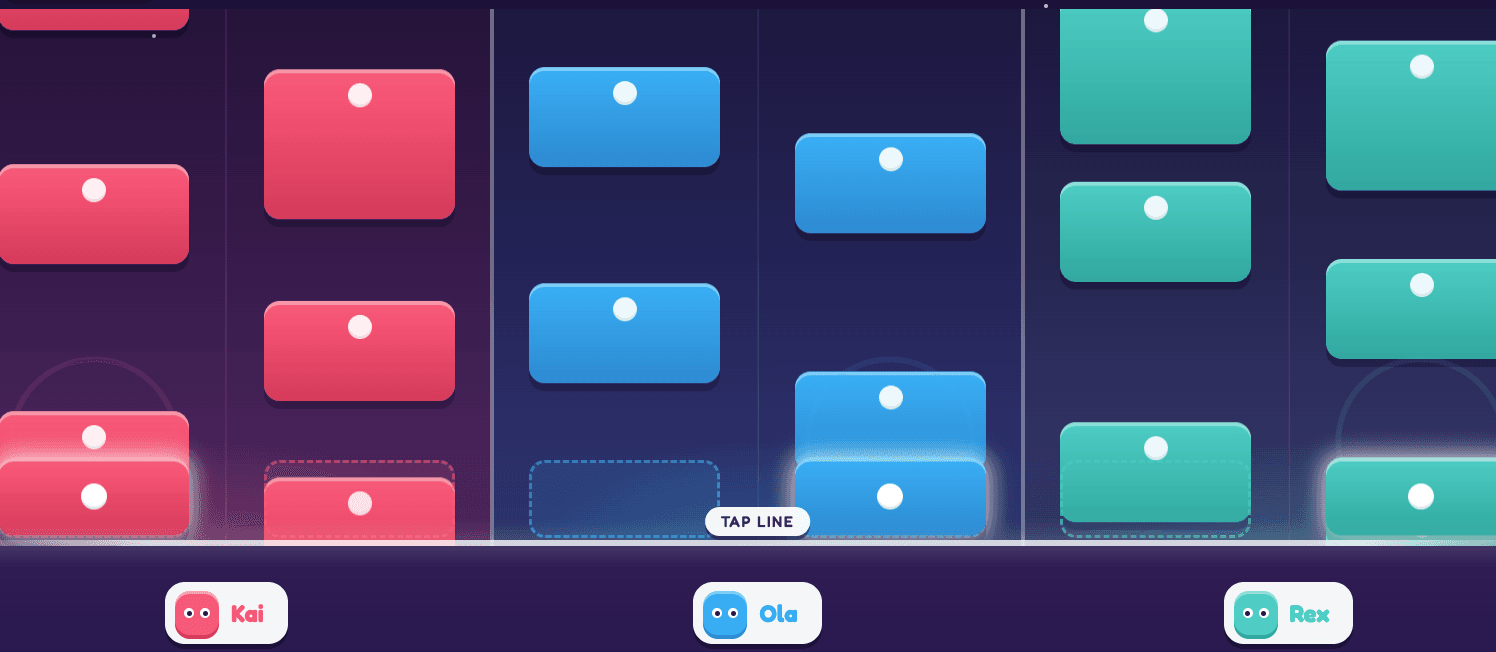
Tile Rush: the song falls down the shared screen, and each phone owns two lanes of it.
Four decisions do the work.
The song is split, not duplicated. A real MIDI piece — Für Elise, or Chopin's Nocturne Op. 9 No. 2 — has its pitch range divided into one zone per player. You are not all racing through the same notes on separate screens. You are each playing a part of one performance, and the piece only sounds right if everybody holds their section.
Your phone is two pads. L and R, one per lane, big enough to hit without looking down. Tap the moment your tile crosses the strike line. There is nothing to learn beyond that, which is the point of borrowing from Piano Tiles in the first place.
The party shares one life. Any miss ends the run for everyone — and tapping a lane that had no tile in it counts as a miss too, so panicking costs as much as being late. That single rule is what makes it a group game rather than eight simultaneous solo games. The room's attention converges on whoever has the busy section.
There is no scoreboard. Nobody is ranked and there are no points. You either finish the song together or you don't, and when you don't, a retry prompt comes straight up — Continue restarts immediately, with no results screen to sit through. Failed runs cost about four seconds of dead time.
More players makes it easier and harder: each person gets fewer notes, but the hand-offs between zones multiply.
Which one should you actually play tonight?
- Two people, a bus ride, the game already installed — Piano Tiles, side by side. Nothing beats it for a two-player duel with no screen to share.
- A five-minute distraction in the middle of an evening — Piano Tiles, hotseat, scores written down.
- Four to eight people in a room with a TV — Tile Rush. This is the case the one-screen layout exists for.
- Nobody wants to install anything — Tile Rush. Phones open a link and become pads.
- You want a winner declared at the end — Piano Tiles. Tile Rush has no scores by design.
The deciding factor is usually the screen, not the game. If the room has a TV or a laptop plugged into one, putting the tiles there is strictly better than six people crowding a 6-inch display. If it doesn't, the hotseat version is the one that works.
Setting up the group version
If you want to try the one-screen version, the whole setup is three steps and no installs:
- Open lanplays.com on the TV, a laptop or a projector. That screen becomes the arena.
- Everybody scans the QR code shown there, or types the room code into the join box on the home page.
- Pick Tile Rush, choose a song, and start. The first few bars teach the timing.
Phones need nothing but a browser — no app store, no account. Full detail is on the how to play page, and the rest of the catalogue is at all games if the room wants something competitive afterwards.
Playing Piano Tiles in a group: FAQ
Does Piano Tiles have a multiplayer mode?
Not an official one for a room full of people. Some versions of the game have included online or head-to-head challenge features, but the core format is a solo, single-phone score chase. Group play means either passing a phone around or choosing a game designed for several players.
Can we play Piano Tiles on a TV?
Not the mobile game itself, without screen mirroring — and mirroring adds input lag, which is fatal in a rhythm game where timing is the entire mechanic. A game built to run on the big screen with phones as controllers avoids the problem, because the TV only has to display and the taps go straight to the host.
How many people can play Tile Rush?
One to eight. Solo works — you simply own every zone — but it is designed around the hand-offs between players, so it is at its best from about four.
Is it competitive?
No. Tile Rush is the co-op game in the LanPlay collection: no points, no ranking, one shared life. If your group wants a winner declared, play Piano Tiles hotseat with scores written down, or pick a competitive game from the catalogue.
Is it free?
Yes — free to play in the browser, no account, no download for players or host. See free browser games for the rest of what's included.
What songs can we play?
Für Elise (Beethoven, about 2:35, brisk) and Nocturne Op. 9 No. 2 (Chopin, about 4:01, flowing), with more planned. Both are real MIDI arrangements, so the notes you tap are the notes of the piece.
Piano Tiles earned its reputation by needing no instructions. The group version keeps that and moves the tiles somewhere everyone can see them — open Tile Rush on the big screen and let the first song explain itself.
Try it on your own TV
Thirteen free party games, phones as controllers, nothing to install. Open it on the big screen and scan the code.
Host a GameRelated reading
Browser Games: Why They’re Back and What to Play
Discover why browser games are getting attention, what to play solo or with friends, and how to turn a TV and phones into game night. Start here.
Games Like Fart Together You Can Play Without Downloading Anything
Fart Together nailed the shared-raft co-op idea, but it needs a gaming PC and a Steam install per player. Here is what the same game looks like with the setup removed.
The LanPlays Android TV App: Install It Once, Skip the Browser Every Time
A dedicated LanPlay launcher for Android TV and Google TV: faster than typing a URL in the TV browser, and the exact same experience from that first tap.